



This document tries to explain about PGP, OpenPGP Standards, GPG and servers in simpler language as possible.
After reading this document, you will learn
- about OpenPGP Standards
- about PGP and GPG – how they differ
- about hosting PGP public keys and its safety
- how to encrypt/decrypt files, text and emails
- about digital signatures
- how to sign files and verify
- about security concerns of hosting public keys in public servers
What is OpenPGP?
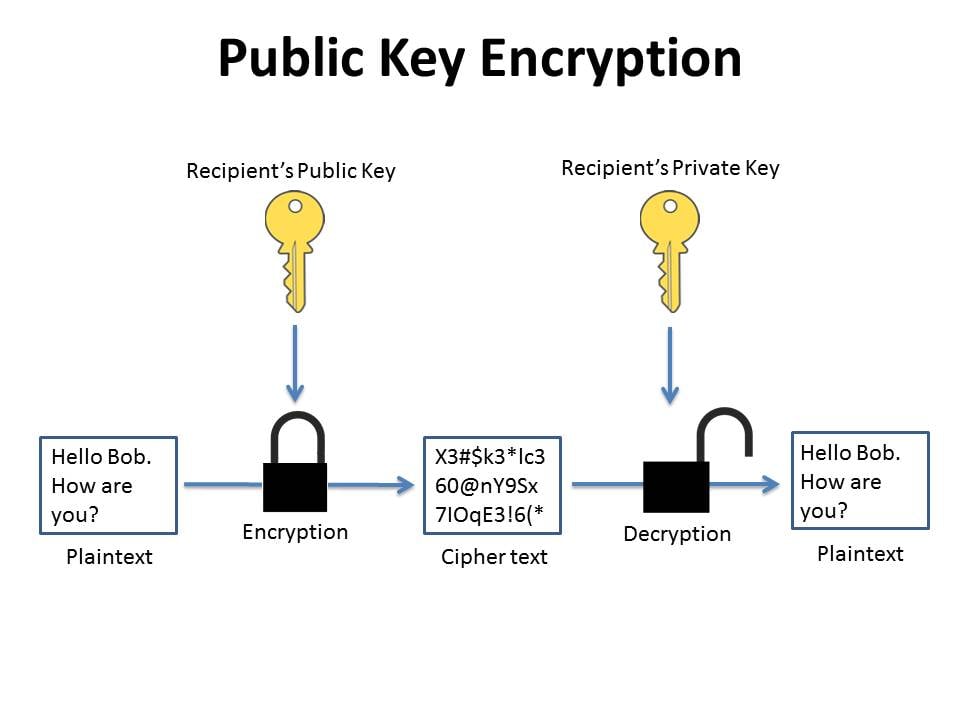
OpenPGP(Open Pretty Good Privacy) is an encryption standard for securing emails and files. It is an open, widely-used standard for encryption and signing data using public-key cryptography where public key encrypts and private key decrypts the message or file. This way we can ensure the confidentiality, authenticity and integrity. It is based on the original PGP software and standardized by IETF(RFC 9580)
What is PGP?

PGP(Pretty Good Privacy) the original proprietary software that is used for encrypting and signing data. It implements the OpenPGP standard. It provides strong encryption using public/private key systems for data confidentiality and authentication.
What is GPG?

GPG(GNU Privacy Guard) is a free and open-source software for encrypting, decrypting, and signing data and communications. It is based on OpenPGP Standard. It uses public-key cryptography(asymmetric encryption) with key pairs(public/private) to secure data, verify authenticity and ensure privacy. It is an open-source alternative of PGP.
It is commonly used to sign git-commits. See this post
Cheat Sheet
| Command | Purpose |
|---|---|
gpg --full-generate-key |
Create a new key pair |
gpg --list-keys |
Show public keys |
gpg --list-secret-keys |
Show private keys |
gpg --armor --export |
Export public key |
gpg --import file.asc |
Import someone’s public key |
gpg --encrypt --recipient file |
Encrypt file |
gpg --decrypt file.gpg |
Decrypt file |
gpg --sign file |
Sign file |
gpg --verify file.gpg |
Verify signature |
Common Command Examples
1
2
3
4
5
6
7
8
9
10
11
12
13
14
# Export your public key
gpg --armor --export your@email.com > mypubkey.asc

# Encrypt a File
gpg --encrypt --recipient your@email.com secret.txt

# Decrypt a File
gpg --decrypt secret.txt.gpg > secret.txt

# Sign a file
gpg --sign document.txt

# Verify a Signature
gpg --verify document.txt.gpg
Hosting Your Public Keys In Public Websites
For exchanging encrypted messages with 2nd party, you need to share public keys. You can then ask them to goto key hosting site and search for the public keys. A proper way to share your public key is to upload to different hosts like
How Secured Is It To Host Public Keys Publicly?

We might think that public keys can be searched using the email of submitter. We can assume that it is publicly exposed, any one can know your email. But it is not that unsecured like we think. Since, we encrypt message/file with public-key of the receiver and they will decrypt with the private-key they have in their machine, their is no way anybody tapping the message and public key can do anything to the message.
Also,to digitally sign a file, we sue private-key of sender and receiver is supposed to verify using sender’s public-key.